
This project shows about Smooth Servo Rotation Circuit with Arduino and Potentiometer, just turn the knob and see servo arm moves smooth from 0° to 180°.
Circuit is easy and fun to learn how Arduino reads analog signal and makes motion; also its a good project for beginners in robotics, automation or motor control.
Arduino Code:
#include <Servo.h>
Servo myservo;
int potPin = A0;
int val;

void setup() {
myservo.attach(9);
}

void loop() {
val = analogRead(potPin);
val = map(val, 0, 1023, 0, 180);
myservo.write(val);
delay(15);
}
Coding Explanation:
- Servo library included to control servo motor easily.
- Servo connected to pin 9 using attach function.
- Analog value from potentiometer, read using analogRead(A0).
- The map function changes range 0–1023 to 0–180.
- Servo moves to new angle using myservo.write(val).
- Delay gives smooth movement.
Circuit Working:
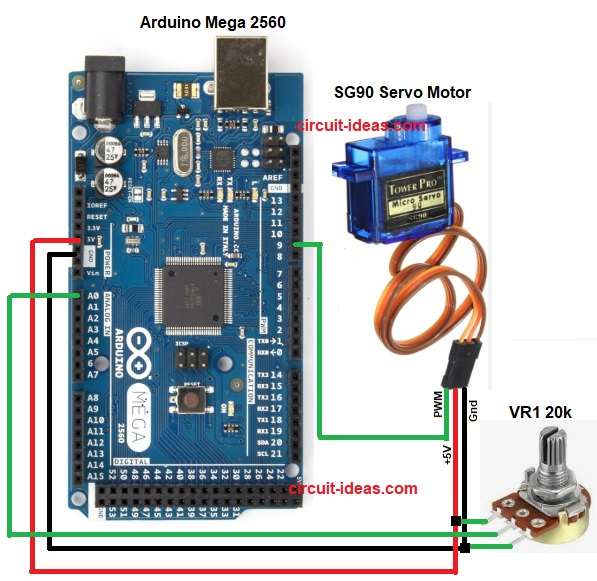
Parts List:
| Components | Quantity |
|---|---|
| SG90 Servo Motor | 1 |
| Arduino Mega 2560 | 1 |
| Potentiometer 20k | 1 |
Potentiometer gives analog voltage between 0V and 5V and then Arduino reads this voltage using analog pin A0.
The Arduino converts the input into a value between 0 and 1023 and maps this value to a servo angle between 0 and 180 degrees.
Therefore, when we rotate the potentiometer then the servo moves accordingly.
Formula with Calculation:
Below is the formula for Potentiometer output voltage = (Position / Full rotation) × 5V
Arduino analog value = (Voltage / 5V) × 1023
Example:
If potentiometer gives 2.5V then,
Analog value = (2.5 / 5) × 1023 = 511
Mapped servo angle = (511 / 1023) × 180 = 90 degrees
How to Build:
To build a Smooth Servo Rotation Circuit with Arduino and Potentiometer follow the below steps for connection:
- First, assemble all the parts as shown in circuit diagram.
- Next, connect the servo motor red wire to Arduino 5V.
- Also, connect the servo black wire to GND.
- Then connect the servo signal wire (usually yellow or orange) to Arduino pin 9.
- After that, connect the middle pin of potentiometer to Arduino analog pin A0.
- Now connect one side of potentiometer to 5V and then connect the other side of potentiometer to GND.
Conclusion:
To conclude, Smooth Servo Rotation Circuit with Arduino and Potentiometer is simple and easy to give it a try; here, potentiometer moves servo angle smoothly.
Furthermore, this project teaches analog input and PWM output and is useful in robotic arms, camera control and small automation systems.