
Want to control appliances by touch? then this circuit makes it possible.
This Arduino Touch Sensor Relay Circuit uses Arduino and touch sensor.
Arduino reads touch signal and relay works like toggle switch.
Touch sensor is touched once and relay turns ON.
If we touch again then relay turns OFF, each touch changes relay state.
ON becomes OFF and OFF becomes ON.
This project is useful for home automation where we can control light, fan or other load devices.
Arduino Coding:
int touchPin = 2;
int relayPin = 8;

int lastTouchState = LOW;
int relayState = LOW;

void setup()
{
pinMode(touchPin, INPUT);
pinMode(relayPin, OUTPUT);
digitalWrite(relayPin, relayState);
}

void loop()
{
int touchState = digitalRead(touchPin);

if (touchState == HIGH && lastTouchState == LOW)
{
relayState = !relayState;
digitalWrite(relayPin, relayState);
delay(300);
}

lastTouchState = touchState;
}
Circuit Working:
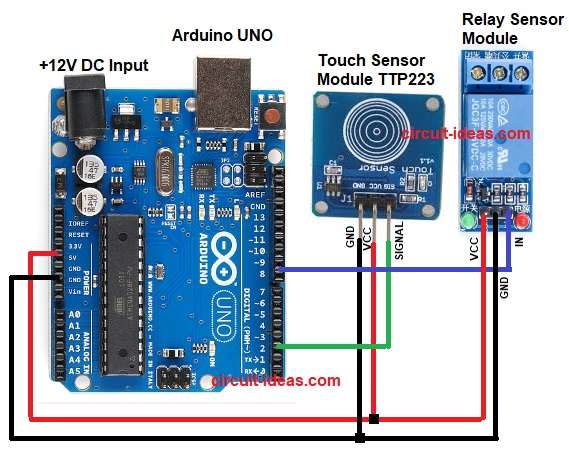
Parts List:
| Component Name | Quantity |
|---|---|
| Arduino UNO | 1 |
| Touch Sensor Module TTP223 | 1 |
| Relay Sensor Module | 1 |
The TTP223 touch sensor works like a switch, it detects finger touch.
It gives digital output when output is HIGH or LOW.
Arduino reads this signal and it toggles the relay output.
Relay changes contact position and connected load turns ON or OFF.
Each touch changes the state.
How to Build:
To build a Arduino Touch Sensor Relay Circuit following steps are required for connection:
- Take all the parts as shown in circuit diagram.
- Touch Sensor VCC pin goes to Arduino 5V
- Touch Sensor GND pin connects to Arduino GND
- Touch Sensor SIGNAL pin goes to Arduino Digital Pin 2
- Relay VCC pin connects to Arduino 5V
- Relay GND pin connects to Arduino GND
- Relay IN pin goes to Arduino Digital Pin 8
- Connect relay COM and NO terminals pins to the required load.
- Use NC if normally ON is needed.
Conclusion:
This is a simple Arduino Touch Sensor Relay Circuit.
It uses few components which are easily available in market.
Arduino coding is easy and relay works as toggle switch.
Project is good for beginners and it is useful in real life automation.