
FM (Frequency Modulation) is a common way to send audio by radio signals.
Many people like making FM transmitters with Arduino because DIY electronics is getting popular.
In this project for Simple Arduino FM Transmitter Circuit we have used Arduino Uno, KT0803K FM module, 7809 voltage regulator and simple antenna to make FM transmitter.
This circuit is fun and helps us learn how radio works.
Code:
#include <Wire.h>

#define SCL_PIN A5 // Define SCL pin
#define SDA_PIN A4 // Define SDA pin

void setup() {
  Serial.begin(9600);
  Wire.begin(SDA_PIN, SCL_PIN); // Initialize I2C communication with specific pins

  // Example of sending a command to the KT0803K
  // Replace with actual commands as per your module's datasheet
  Wire.beginTransmission(0xXX); // Replace 0xXX with the KT0803K I2C address
  Wire.write(0x01); // Example command (modify as needed)
  Wire.endTransmission();
}

void loop() {
  // Add your code to handle audio input and control the KT0803K
}
Code Explanation:
- This line use Wire library and it is needed for I2C connection.
- Wire library helps read and write to I2C devices.
- SCL_PIN is A5 is a Serial Clock Line.
- SDA_PIN is A4 is a Serial Data Line.
- setup() function runs one time when program start.
- Serial.begin(9600); start serial connection at 9600 baud for debug in Serial Monitor.
- Wire.begin(SDA_PIN, SCL_PIN); start I2C with SDA and SCL pins.
- Wire.beginTransmission(0xXX); start talk to I2C device and replace 0xXX with KT0803K address.
- Wire.write(0x01); send command to device and changes 0x01 to right command and check KT0803K datasheet).
- Wire.endTransmission(); stop I2C communication.
- loop() function run again and again after setup().
- Write code here to manage audio, control FM or other things with KT0803K.
Circuit Working:
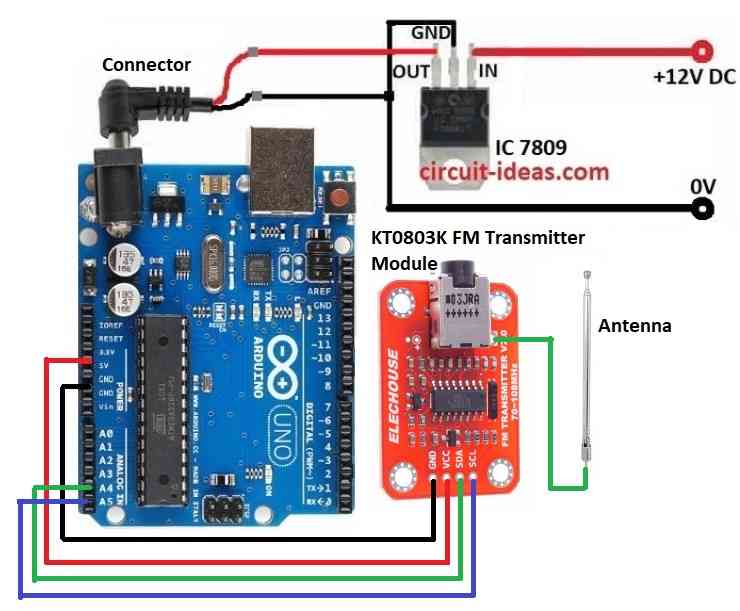
Parts List:
| Component | Quantity |
|---|---|
| Arduino Uno | 1 |
| KT0803K FM Transmitter Module | 1 |
| IC 7809 Voltage Regulator | 1 |
| Antenna | 1 |
IC 7809 gives stable 9V power to Arduino and KT0803K.
Arduino Uno works like brain microcontroller and it controls the transmission.
Arduino sends data to KT0803K module.
KT0803K is main part of transmitter and it changes data into FM radio waves.
Module has pins for antenna, power and data input.
Antenna sends out FM radio waves.
We can change antenna length to get better signal and longer range.
How to Build:
To build a Simple Arduino FM Transmitter Circuit follow the below mentioned steps for connections:
- Collect all parts like in circuit diagram above.
- Use IC 7809 to give steady 9V power to Arduino, see the circuit diagram.
- Connect KT0803K GND pin to Arduino GND.
- Connect KT0803K VCC pin to Arduino 5V.
- Connect KT0803K SDA pin to Arduino A4.
- Connect KT0803K SCL pin to Arduino A5.
- Connect antenna to KT0803K antenna pin as per the circuit diagram.
Conclusion:
Making Simple Arduino FM Transmitter Circuit with KT0803K FM Transmitter Module is fun and good to learn about radio basics.
It easy to build but we can explore more like better sound and how FM works.
Check your country rules before using FM transmission.
Enjoy sending your own audio!