
This project builds a Digital Thermometer Circuit using Arduino and IC LM35, as first, the Arduino reads the voltage from the LM35 sensor, and then it converts this voltage into a temperature value.
Moreover, people have used thermometers for a long time to measure temperature and then finally, the measured temperature appears on a small LCD screen for easy viewing.
Also, with Arduino, we can build a thermometer that displays real-time temperature on a screen, moreover, people can use it in factories, offices and homes.
Thermometer has three parts:
- Temperature sensor.
- Arduino that change sensor value to number.
- Screen which shows the number.
Arduino Code:
#include <LiquidCrystal.h>

// Define LCD pins
const int rs = 12, en = 11, d4 = 5, d5 = 4, d6 = 3, d7 = 2;
LiquidCrystal lcd(rs, en, d4, d5, d6, d7);

// Define
 LM35 pin
const int lm35Pin = A0;

void setup() {
  lcd.begin(16, 2); // Initialize LCD
  Serial.begin(9600); // For debugging
}

void loop() {
  float voltage, temperature;

  // Read analog value from LM35
  int sensorValue = analogRead(lm35Pin);

  // Convert analog value to voltage
  voltage = (sensorValue / 1023.0) * 5.0;

  // Convert voltage to temperature (LM35 outputs 10mV/°C)
  temperature = voltage * 100;

  // Display temperature on LCD
  lcd.setCursor(0, 0);
  lcd.print("Temperature: ");
  lcd.print(temperature);
  lcd.print(" C");

  Serial.print("Temperature: ");
  Serial.print(temperature);
  Serial.println(" C");

  delay(1000);
}
Code Explanation:
- Liquid crystal library added to control LCD.
- Define pins tell which pins for LM35 and LCD.
- Setup make serial connection and start LCD.
- Loop always read analog value from LM35 and then changes it to voltage and temperature and then show temperature on serial monitor and LCD.
Circuit Working:
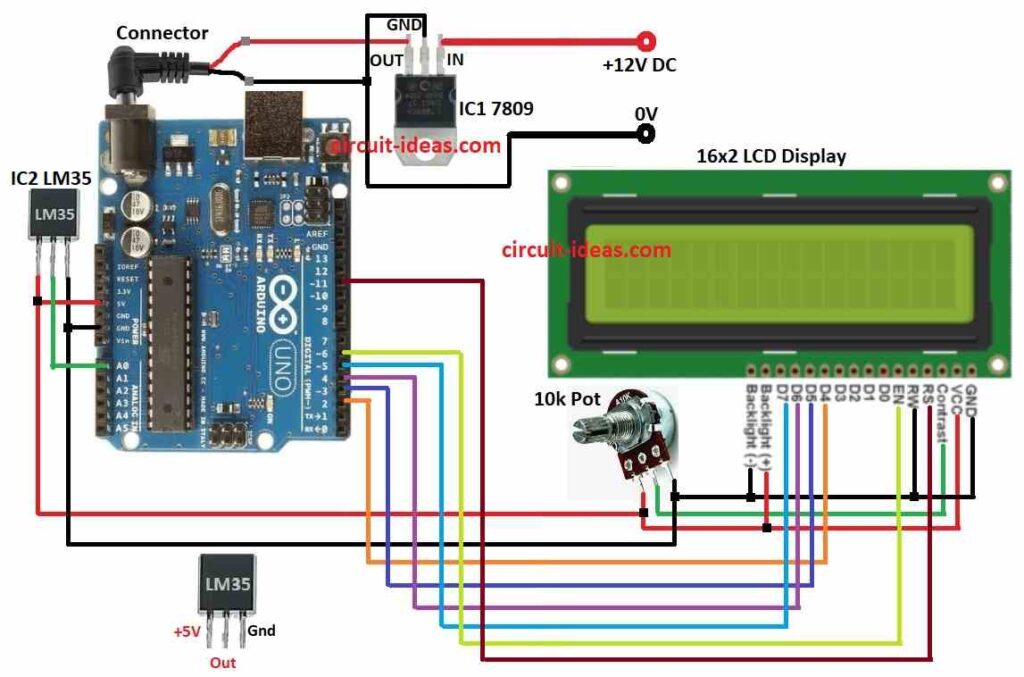
Parts List:
| Components | Quantity |
|---|---|
| Resistor | |
| Potentiometer 10k | 1 |
| Semiconductors | |
| Arduino UNO board | 1 |
| IC1 7809 | 1 |
| IC2 LM35 | 1 |
| 16×2 LCD display | 1 |
To begin with, in this project Arduino Uno control everything in thermometer.
First, IC2 LM35 sensor gives 10 millivolts more for every 1°C rise and it can measure temperature up to 150°C; also it is very simple sensor and easy to use with any microcontroller.
Then IC2 LM35 gives voltage same as temperature and this IC pin give analog voltage and Arduino reads it, also code change analog value to voltage and then to Celsius temperature.
Moreover, LCD 16×2 show the temperature and potentiometer used to control LCD brightness.
But here LCD pin does not connect direct to potentiometer but it controls backlight brightness.
Finally, potentiometer connect to Arduino analog pin and Arduino reads the value and this value change current in LCD backlight and so brightness changes.
How to Build:
To build a Digital Thermometer Circuit using Arduino and IC LM35 follow the below mentioned connections steps:
- First, take all parts like in circuit diagram.
- Next, connect IC2 LM35 sensor to Arduino like IC LM35 VCC connects to 5V, LM35 output connects to A0 and then LM35 GND connects to GND.
- Connect 10k potentiometer to LCD like 1st pin of pot goes to LCD VCC,2nd pin of pot goes to LCD contrast pin and then 3rd pin of pot goes to LCD GND.
- Then use IC1 7809 to give stable 9V DC to Arduino and connect Arduino to 16×2 LCD as shown in circuit diagram and table below.
Pin Connections
| Arduino Pin | LCD Pin | Function |
|---|---|---|
| Digital Pin 2 | D4 | Data Bit 4 |
| Digital Pin 3 | D5 | Data Bit 5 |
| Digital Pin 4 | D6 | Data Bit 6 |
| Digital Pin 5 | D7 | Data Bit 7 |
| Digital Pin 6 | E | Enable |
| Digital Pin 11 | RS | Register Select |
| 5V | VCC | LCD Power Supply |
| Ground | GND | LCD Ground |
Conclusion:
To conclude, making Digital Thermometer Circuit using Arduino and IC LM35 is easy and useful project.
Also it help us to learn how to change analog to digital and how to measure temperature; therefore, this basic project can help us make better temperature monitoring systems later.