
Electric bill increasing day by day; so we need smart way to measure power use.
Here is a simple project using Arduino UNO, ACS712 current sensor and 16×2 LCD with I2C and it shows real time current, voltage and power.
Also, this project for Smart Energy Meter Circuit with Arduino UNO help to monitor load and save electricity.
Arduino Code:
#include <Wire.h>
#include <LiquidCrystal_I2C.h>

LiquidCrystal_I2C lcd(0x27,16,2);
int sensorPin = A0;
float sensitivity = 0.185;
float offset = 2.5;
float voltage = 220.0;

void setup() {
lcd.init();
lcd.backlight();
}

void loop() {
int adcValue = analogRead(sensorPin);
float Vout = (adcValue * 5.0) / 1023.0;
float current = (Vout - offset) / sensitivity;
if(current < 0) current = -current;
float power = voltage * current;

lcd.setCursor(0,0);
lcd.print("I=");
lcd.print(current,2);
lcd.print(" A ");

lcd.setCursor(0,1);
lcd.print("P=");
lcd.print(power,1);
lcd.print(" W ");

delay(500);
}
Coding Explanation:
- Library used for LCD with I2C.
- The I2C LCD works on address 0x27.
- Read analog signal from A0.
- And convert to voltage.
- It subtract offset to find difference.
- And it divide by sensitivity to get current.
- Multiply by 220V to get power.
- And gets display on LCD.
Circuit Working:
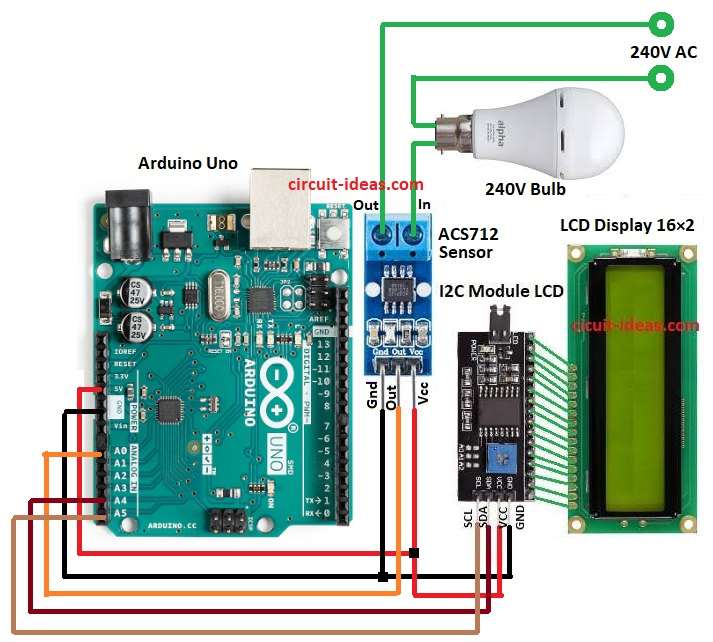
Parts List:
| Components | Quantity |
|---|---|
| Arduino Uno | 1 |
| Current Sensor ACS712 | 1 |
| LCD Display 16×2 with I2C | 1 |
| 240V AC Load | 1 |
Arduino UNO is brain of this circuit and ACS712 sensor measure current from AC load; also the smart energy meter measures current through the load.
When AC current flow through load, ACS712 sense it and then sensor give small voltage change to Arduino.
The Arduino reads the sensors analog output and applies a predefined formula to calculate the current; it also assumes the voltage remains constant at 220V.
Power calculated = Voltage x Current.
Finally, result show on LCD in Ampere, Watt.
Formulas:
Below are some general formulas to calculate current:
Sensor output voltage at no load = Vcc/2 = 2.5V
Sensitivity of ACS712 5A = 185mV per Amp
Current = (Vout – 2.5) / 0.185
Power = Voltage x Current
Energy = Power x Time
How to Build:
To build a Smart Energy Meter Circuit with Arduino UNO following are the connection steps:
- First, assemble all the parts as shown in circuit diagram.
- Next, ACS712 Vcc pin connect to Arduino 5, ACS712 GND pin connect to Arduino GND and then ACS712 OUT pin connect to Arduino A0
- After that, I2C LCD Vcc pin connect to Arduino 5V and I2C LCD GND pin connect to Arduino GND
- Then I2C LCD SDA pin connect to Arduino A4 and I2C LCD SCL connect to to Arduino A5
- Now, connect the load to the ACS712 input terminals and route the 240 V supply through the ACS712 before it reaches the load.
Conclusion:
Overall, this project for Smart Energy Meter Circuit with Arduino UNO is simple but useful, as it shows live current and power ON LCD.
In addition, this circuit help to save energy and check faulty appliances and we can expand with SD card for logging or WiFi for IoT.