Today, many small devices need low voltage for example 1.5V or 3V.
This 5V USB to 1.5V or 3V DC Converter Circuit USB gives 5V output, so a buck converter is needed.
Therefore, this circuit is useful as it converts 5V USB into 1.5V or 3V.
It uses MC34063 IC and this IC is cheap, easy to use, very popular and is easily available in market.
Moreover, this circuit is efficient as it wastes less power, so battery life improves.
Circuit Working:
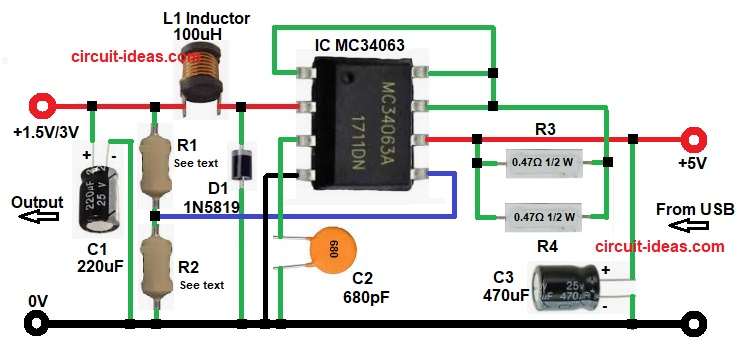
Parts List:
| Components | Value | Quantity | Remarks |
|---|---|---|---|
| Resistors | 0.47Ω 1/2 watt | 2 | |
| 220Ω / 1.5k | 1 | R1 (Voltage set for 1.5V or 3V) | |
| 1k | 1 | R2 (Voltage set for 1.5V or 3V) | |
| Capacitors | Ceramic 680pF | 1 | |
| Electrolytic 220uF 25V, 470uF 25V | 1 each | ||
| Semiconductors | IC MC34063 | 1 | |
| Inductor Coil 100uH | 1 | ||
| Schottky Diode 1N5819 | 1 | ||
| USB Type-A / Micro USB for 5V input supply | 1 |
This circuit is a step down converter and it is also called buck converter.
Input voltage is 5V and output voltage is 1.5V or 3V.
First, 5V comes from USB and then capacitor C3 removes noise.
MC34063 is main IC and it is heart of circuit which starts oscillating and it controls switching.
Pin 2 drives internal switch with inductor L1 gets charged and it stores energy.
Then switch turns OFF and stored energy flows through diode D1 and output capacitor C1 gets charged.
At same time feedback resistors check output and voltage goes to pin 5 and IC compares voltage inside.
If voltage is high the switching becomes less and if voltage is low the switching becomes more.
So, output voltage stays constant.
Formula with Calculation:
The MC34063 feedback reference is 1.25V
Formula:
Vout = 1.25 × (1 + R1 / R2)
For 1.5V output:
We have taken R2 = 1k
Now lets calculate R1:
1.5 = 1.25 × (1 + R1 / 1000)
1.5 / 1.25 = 1 + R1 / 1000
1.2 = 1 + R1 / 1000
R1 / 1000 = 0.2
R1 = 200Ω
Final values for 1.5V is:
R1 = 220Ω (standard value)
R2 = 1kΩ
This gives around 1.52V which is perfect for 1.5V devices.
For 3V output:
We have kept R2 = 1k
Now calculate R1:
3 = 1.25 × (1 + R1 / 1000)
3 / 1.25 = 1 + R1 / 1000
2.4 = 1 + R1 / 1000
R1 / 1000 = 1.4
R1 = 1.4kΩ
Final values for 3V is :
R1 = 1.5kΩ (standard value)
R2 = 1kΩ
This gives around 3.1V which is safe and acceptable.
Summary for 1.5V / 3V:
| Output Voltage | R1 Value | R2 Value |
|---|---|---|
| 1.5V | 220Ω | 1k |
| 3V | 1.5k | 1k |
How to Build:
To build a 5V USB to 1.5V or 3V DC Converter Circuit follow the below steps for connection:
- First, collect all components as per circuit.
- Then connect IC pin 1 and joins with IC pin 7 and pin 8.
- Next, connect IC pin 2 and this pin goes to output side.
- Connect through diode D cathode.
- Then connect inductor L1.
- After that connect resistor R1.
- Also connect capacitor C2 positive.
- After this connect IC pin 3 to capacitor C1 from pin 3 to GND.
- Then connect IC pin 4 and this pin goes directly to GND.
- Next, connect IC pin 5 which connect it between resistor R1 and R2.
- Afterwards, connect IC pin 6 which connects it to +5V supply.
- Then connect IC pin 7 which connect one end of resistor R3 to pin 7.
- Other end of R3 goes to pin 6.
- Now connect IC pin 8 which join with pin 7.
- After this, connect input capacitor C3 whose positive goes to +5V input and negative goes to GND.
- Lastly, connect output capacitor C2 whose positive goes to 1.5V or 3V output and negative goes to GND.
- Finally, check all connections and then power ON the circuit.
Conclusion:
To conclude, this 5V USB to 1.5V or 3V DC Converter Circuit is very useful.
It converts USB 5V to low voltage, therefore beginners can build it easily.
IC MC34063 makes design simple as few components are required for this circuit.
This circuit is reliable and efficient which professionals can also use it.
At last, this buck converter circuit is a good choice one should give it a try for.

Leave a Reply