This project is for Arduino Piano Music Keyboard with Memory Circuit and its main parts are Arduino Uno, push buttons, buzzer, LCD and resistors.
When button is press then buzzer make piano sound, LCD show note name on screen and then we can record notes and play again later.
Furthermore, it is small and fun project and is good for learning Arduino, electronics and music.
Arduino Code:
#include <LiquidCrystal.h>
#include <Tone.h>

LiquidCrystal lcd(12, 11, 5, 4, 3, 2);
int buzzer = 10;
int keys[8] = {A0, A1, A2, A3, A4, A5, 6, 7};
int notes[8] = {262, 294, 330, 349, 392, 440, 494, 523};
int recordData[100];
int recordTime[100];
int index = 0;
bool recording = false;
unsigned long lastTime;

void setup() {
lcd.begin(16,2);
lcd.print("Arduino Piano");
for(int i=0;i<8;i++){
pinMode(keys[i],INPUT);
}
pinMode(buzzer,OUTPUT);
delay(1000);
lcd.clear();
}

void loop() {
for(int i=0;i<8;i++){
if(digitalRead(keys[i])==HIGH){
tone(buzzer,notes[i],300);
lcd.setCursor(0,0);
lcd.print("Note: ");
lcd.print(notes[i]);
if(recording){
recordData[index] = notes[i];
recordTime[index] = millis()-lastTime;
lastTime = millis();
index++;
}
delay(300);
}
}
if(digitalRead(8)==HIGH){
recording = true;
index = 0;
lastTime = millis();
lcd.clear();
lcd.print("Recording...");
delay(500);
}
if(digitalRead(9)==HIGH){
lcd.clear();
lcd.print("Playing...");
for(int j=0;j<index;j++){
delay(recordTime[j]);
tone(buzzer,recordData[j],300);
}
recording = false;
delay(500);
}
}
Code Explanation:
- First LCD library used for display.
- Buzzer pin defined.
- Notes frequency array used for 8 notes.
- Push buttons connected to analog and digital pins.
- In loop Arduino check button press.
- If pressed then it plays tone and display frequency on LCD.
- If recording is true, the Arduino saves the note and its time difference in an array.
- One button start recording and another button start replay.
- During replay, Arduino read notes and play them back with same delay.
Circuit Working:
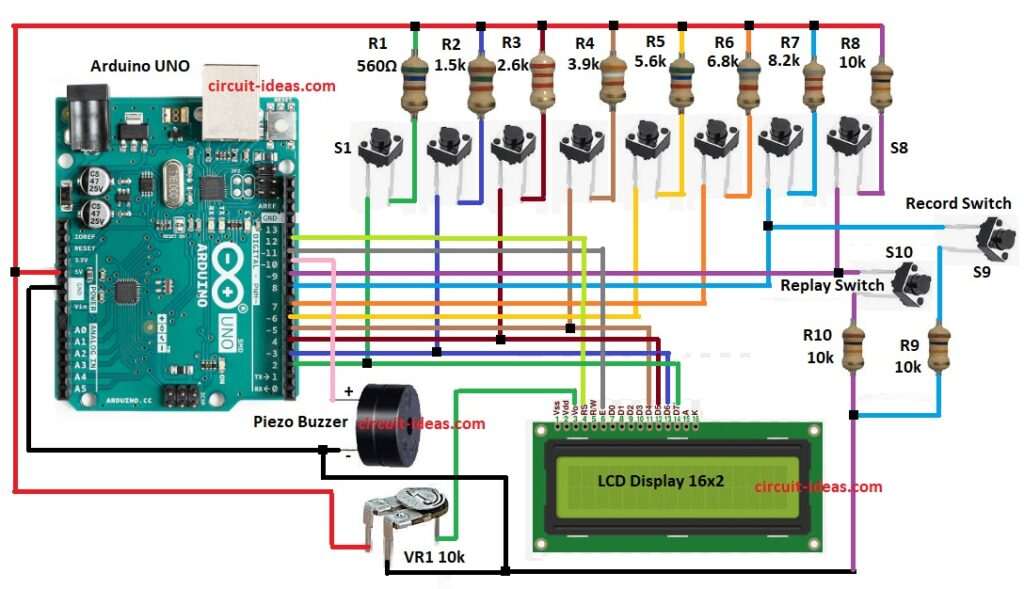
Parts List:
| Components | Values | Quantity |
|---|---|---|
| Resistors (All resistors are 1/4 watt unless specified) | 10k | 3 |
| 560Ω | 1 | |
| 1.5k | 1 | |
| 2.6k | 1 | |
| 3.9k | 1 | |
| 5.6k | 1 | |
| 6.8k | 1 | |
| 8.2k | 1 | |
| Preset 10k | 1 | |
| Semiconductors | Arduino UNO Board | 1 |
| LCD Display 16×2 | 1 | |
| Piezo Buzzer | 1 | |
| Tactile Switches S1 to S8 piano keys | 8 | |
| Record Tactile Switch | 1 | |
| Replay Tactile Switch | 1 |
Arduino Uno is brain of this project.
The circuit uses a total of 10 tactile switches, eight switches function as piano keys, while two additional switches are located near the buzzer and LCD.
One for Record and one for replay; when button is press then Arduino check which one and each button send signal to Arduino.
Arduino play tone on buzzer for that button and then LCD also show note name and then VR1 preset use for LCD contrast adjust.
After that, power come from Arduino 5V and GND to breadboard rails and resistors used as pull down for buttons.
When record mode is ON, the Arduino saves the notes along with their time intervals and when the user presses the replay button, the Arduino reads the saved notes and plays them again with the same timing.
Formulas:
Frequency of tone given by formula:
f = 1/T
where,
- f is the frequency
- T is time period for (1/f)
Arduino tone function use square wave.
How to Build:
To build a Arduino Piano Music Keyboard with Memory Circuit follow the below steps for connections:
- First, collect all parts same like circuit diagram.
Push button connections:
- Next, 8 tactile switches go to Arduino digital pins 2,3,4,5,6,7,8,9 through resistors.
- Then record switch one side go to Arduino pin 8 and other side go to GND.
- After that, put 10k resistor pull-down between pin 8 and GND.
- Now replay switch one side go to Arduino pin 9 and other side go to GND.
- Also, put 10k resistor pull-down between pin 9 and GND.
Buzzer connections:
- Buzzer positive leg (+) connect to Arduino pin 10 and buzzer negative leg (–) connect to GND.
LCD connections:
- 16×2 LCD connect in 4-bit mode: RS to pin 12, E to pin 11, D4 to pin 5, D5 to pin 4, D6 to pin 3, D7 to pin 2.
Preset connections:
- VR1 middle pin go to LCD pin V0 (pin 3), then one side of VR1 go to +5V and other side of VR1 go to GND.
Conclusion:
To conclude, this Arduino Piano Music Keyboard with Memory Circuit is simple project, it is small and fun to make.
Also, project show how to use buttons, buzzer, LCD and memory in Arduino; furthermore, we can add more notes in future and we can use better buzzer or speaker.
Moreover, we can use SD card for saving songs, it is a good project for learning embedded system and this circuit is also nice DIY music toy for beginners.

Leave a Reply