• Skip to primary navigation
  • Skip to main content
  • Skip to primary sidebar

Circuit Ideas for You

Get free circuit ideas online.

  • Home
  • Privacy Policy
  • About
Home » Arduino Based Control LED Light Circuit with Potentiometer

Arduino Based Control LED Light Circuit with Potentiometer

Last updated on 30 October 2025 by Admin-Lavi Leave a Comment

Want to make an LED glow bright or dim just by turning a knob?

This simple Arduino Based Control LED Light Circuit with Potentiometer does that same thing.

Turn the knob to adjust the LED light from soft to full brightness.

It is a fun and easy way to learn how Arduino reads analog signals.

It also shows how PWM controls the LED light intensity.

Arduino Coding:

int potPin = A0;
int ledPin = 9;
int potValue = 0;
int ledValue = 0;

void setup() {
pinMode(ledPin, OUTPUT);
}

void loop() {
potValue = analogRead(potPin);
ledValue = map(potValue, 0, 1023, 0, 255);
analogWrite(ledPin, ledValue);
delay(10);
}

Coding Explanation:

  • PotPin read analog value from potentiometer between 0 and 1023.
  • Map function change this value to range 0 to 255.
  • AnalogWrite send PWM signal to LED pin 9.
  • When we turn potentiometer, voltage also change.
  • This change make LED bright or dim.

Circuit Working:
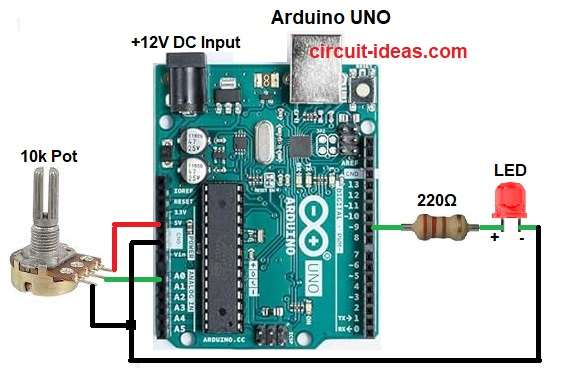
Arduino Based Control LED Light Circuit Diagram with Potentiometer

Parts List:

Component NameSpecificationQuantity
Resistors220Ω 1/4 watt1
Potentiometer 10k1
SemiconductorsArduino UNO Board1
LED any color1

When the potentiometer is rotated, its resistance changes.

This changes the voltage on analog pin A0.

Arduino reads this voltage and creates a PWM output.

PWM controls the average current through the LED.

So the LED becomes dim or bright.

How to Build:

To build a Arduino Based Control LED Light Circuit with Potentiometer follow the below collection steps:

  • Take all the parts as shown in circuit diagram above.
  • Connect the potentiometer middle pin to analog pin A0 of Arduino.
  • Connect the left pin of the potentiometer to 5V.
  • Connect the right pin of the potentiometer to GND.
  • Connect the LED positive leg (anode) to digital pin 9 through a 220 ohm resistor.
  • Connect the LED negative leg (cathode) to GND of Arduino.

Conclusion:

This Arduino Based Control LED Light Circuit with Potentiometer is a simple way to control LED brightness.

It helps to learn about analog input and PWM output in Arduino.

We can use this in small light dimmer projects or sensor control projects.

References:

LED brightness control with a potentiometer [duplicate]

Filed Under: Arduino Projects, LED and Lamps

About Admin-Lavi

Lavi is a B.Tech electronics engineer with a passion for designing new electronic circuits. Do you have questions regarding the circuit diagrams presented on this blog? Feel free to comment and solve your queries with quick replies

Previous Post: « Push Button LED Circuit using Arduino
Next Post: Adjust LED Glow with Potentiometer Circuit »

Reader Interactions

Leave a Reply Cancel reply

Your email address will not be published. Required fields are marked *

Primary Sidebar


Categories

  • Alarm Circuits (45)
  • Amplifier Circuits (67)
  • Arduino Projects (99)
  • Audio Circuits (114)
  • Automobile Circuits (19)
  • Battery Charger Circuits (65)
  • Free Energy (13)
  • Heater and Temperature Controllers (13)
  • High Voltage (1)
  • Indicator Circuits (45)
  • Inverter Circuits (20)
  • IoT projects (1)
  • LDR Circuits (26)
  • LED and Lamps (148)
  • Meters and Testers (30)
  • Motor Controllers (22)
  • Oscillator Circuits (39)
  • Power Supply Circuits (104)
  • Remote Control Circuits (10)
  • Security and Protection (29)
  • Sensors and Detectors (126)
  • Solar Circuits (29)
  • Timer Circuits (41)
  • Transistor Circuits (87)
  • Transmitter Circuit (17)
  • Tutorials (8)
  • Water Level Controller (6)

Recent Posts

  • 12V Battery Low Voltage Alarm Circuit
  • Low Voltage Alert Circuit for 9V Battery
  • Digital Code Lock Circuit using IC 4017
  • Darkness Activated LED Circuit
  • Fan Start 10 Second Delay Timer Circuit

Recent Comments

  1. TDHofstetter on DIY Variable Power Supply Circuit using Arduino
  2. feathbuff on Simple Micro Ampere Meter Circuit
  3. Admin-Lavi on Simple School Project Multimeter Circuit
  4. choke on Simple School Project Multimeter Circuit
  5. Admin-Lavi on Analog to Digital Converter Circuit using IC 555

Copyright © 2026 | New Circuit Ideas