
Hall sensor feel magnet near it and it make signal when magnet is close, then signal can be digital or analog and here Arduino reads this signal.
We can view the results on a computer or LED and the circuit checks motor speed, wheel speed or position.
Arduino Code:
int digitalPin = 2;
int analogPin = A0;
int digitalValue = 0;
int analogValue = 0;

void setup() {
  Serial.begin(9600);
  pinMode(digitalPin, INPUT);
}

void loop() {
  digitalValue = digitalRead(digitalPin);
  analogValue = analogRead(analogPin);

  Serial.print("Digital Value: ");
  Serial.println(digitalValue);

  Serial.print("Analog Value: ");
  Serial.println(analogValue);

  delay(500);
}
Coding Explanation:
- digitalPin connected to DO of sensor.
- analogPin connected to AO of sensor.
- In setup we start serial monitor and set in pin mode.
- In loop Arduino reads both the values.
- It prints digital and analog values.
- Delay added for better reading.
Circuit Working:
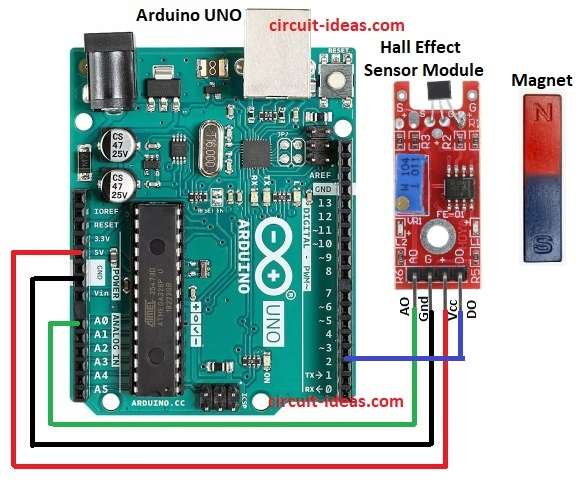
Parts List:
| Components | Quantity |
|---|---|
| Arduino UNO | 1 |
| Hall Effect Sensor Module | 1 |
The Arduino code for the Hall sensor is simple and the circuit connections are easy; the sensor detects a magnet nearby and its output changes when a magnetic field is present.
Then digital output goes HIGH or LOW based on the magnets pole and analog output gives a voltage proportional to the magnetic field.
Finally, Arduino reads these values and displays the result.
Note: Go though the below link for Hall Effect Sensor Module Circuit:
Hall Effect Sensor Circuit with IC LM393
Formulas:
General formula for Hall Effect sensor is:
VH = (RH × I × B) / t
here,
- RH is the hall coefficient
- I is the current
- B is the magnetic field strength
- t is the sensor thickness
How to Build:
For Interfacing Hall Effect Magnetic Sensor Circuit with Arduino follow the below steps for connections:
- First, assemble parts as in circuit diagram.
- Next, connect Arduino 5V to sensor VCC.
- After that, connect Arduino GND to sensor GND.
- Now connect Arduino A0 to sensor AO (analog out).
- Also, connect Arduino D2 to sensor DO (digital out).
Conclusion:
To conclude, Interfacing Hall Effect Magnetic Sensor Circuit with Arduino is easy and it can detect magnetic field quickly and then sensor gives analog and digital output.
Furthermore, the project supports speed sensing, detects position and enhances security systems.