A Seven Segment Display is a simple electronic display device that shows numbers from 0 to 9.
Moreover, it contains seven LED segments arranged in the shape of the number “8,” and engineers name each segment from a to g.
By turning ON different segments, it can display different numbers.
LEDs make the display bright and popular, but however, manufacturers now also use LCDs in many devices, furthermore, microwaves, calculators, washing machines, radios, digital clocks and many other electronic projects use seven-segment displays to show numbers.
Also, this article explains the datasheet, pin configuration and working of a seven segment display and it also helps beginners understand how the display works and how to connect it in electronic circuits.
Next we see 7-segment pins for better understanding.
Diagram with Pinouts:

A seven-segment display has seven light segments and these segments work together to form numbers and letters.
Also, different combinations of illuminated segments display different characters, furthermore, these segments can display binary data.
An LED is a P-N junction diode that emits light when current flows through it, in addition, it produces much less heat than a normal incandescent lamp.
In contrast, an LCD uses liquid crystals and cannot produce light by itself and therefore, manufacturers use LED and LCD displays to show numbers, letters and other characters in electronic devices.
Pin Configuration:
Seven Segment Display mostly have 10 pins and one pin is common, so Below table show pin setup:
| Pin | Segment | Function |
|---|---|---|
| 1 | E | Controls segment ‘E’ |
| 2 | D | Controls segment ‘D’ |
| 3 | Common | Common Cathode/Anode |
| 4 | C | Controls segment ‘C’ |
| 5 | DP | Controls the decimal point (optional) |
| 6 | B | Controls segment ‘B’ |
| 7 | A | Controls segment ‘A’ |
| 8 | Common | Common Cathode/Anode |
| 9 | F | Controls segment ‘F’ |
| 10 | G | Controls segment ‘G’ |
Common Anode 7-Segment Display:
All negative pins anode of 8 LEDs join together and positive pins stay separate.
Common Cathode 7-Segment Display:
All positive pins cathode of 8 LEDs join together and negative pins stay separate.
How it Works:
First, each segment has a small LED and it turn ON some segments to show numbers.
Also, LEDs glow when its forward-biased and its brightness depends on forward current.
Then diver gives enough current to light all segments fully, for example to show 8 it light up all 7 segments from A to G, also example it show numbers on Common Cathode SSD.
Decimal Digit Representation (CC):
| Digit | A | B | C | D | E | F | G |
| 0 | 1 | 1 | 1 | 1 | 1 | 1 | 0 |
| 1 | 0 | 1 | 1 | 0 | 0 | 0 | 0 |
| 2 | 1 | 1 | 0 | 1 | 1 | 0 | 1 |
| 3 | 1 | 1 | 1 | 1 | 0 | 0 | 1 |
| 4 | 0 | 1 | 1 | 0 | 0 | 1 | 1 |
| 5 | 1 | 0 | 1 | 1 | 0 | 1 | 1 |
| 6 | 1 | 0 | 1 | 1 | 1 | 1 | 1 |
| 7 | 1 | 1 | 1 | 0 | 0 | 0 | 0 |
| 8 | 1 | 1 | 1 | 1 | 1 | 1 | 1 |
| 9 | 1 | 1 | 1 | 1 | 0 | 1 | 1 |
Hence, for Common Anode the logic is opposite and gives 0 (LOW) to turn ON the segment.
Interfacing a 7-segment display to Arduino UNO:
Below we have connected a 7-segment display to Arduino UNO for example:
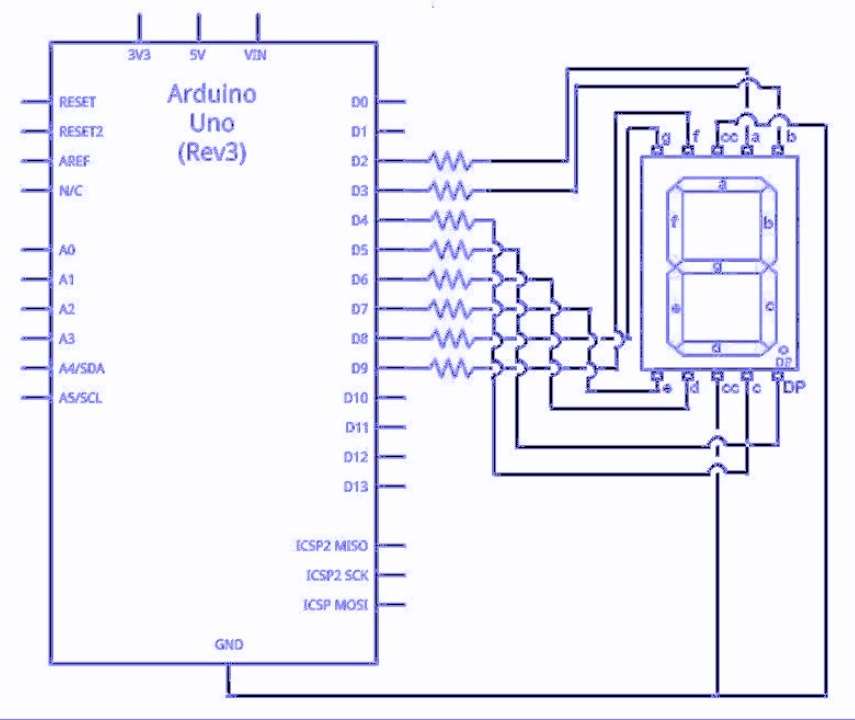
We connect 7-segment display to Arduino UNO and then each segment has one pin.
Further, Arduino controls which segments turns ON and when turn ON some segments shows number, therefore, we use wires to join display pins to Arduino pins.
Now power Arduino display which shows numbers.
How to Build:
Seven Segment Display Circuit (SSD) made up of:
- First, manufacturers make the outer body from plastic or epoxy and they arrange seven small LEDs in the shape of the number “8”.
- After that, the display uses either common-cathode or common-anode wiring inside and metal pins connect the display to electronic circuits.
Formulas and Calculations:
To keep SSD safe use right resistor with each LED, so use Ohms Law to the find resistor:
Formula:
R = (Supply Voltage – LED Forward Voltage) / Desired Current
where,
- R is the resistor in ohms Ω.
- Supply Voltage is from Arduino or battery.
- LED Forward Voltage is drop across LED when ON.
- Desired Current is current through LED in amperes.
Conclusion:
Overall, this project for Seven Segment Display Circuit is simple and with low cost, as this seven segment display show numbers clearly.
Furthermore, it is easy to connect with IC or Arduino and this circuit is useful in calculator, clock, counter and digital meter.

Leave a Reply