
This project for DC Motor Speed Controller Circuit shows how to control DC motor speed using Arduino, MOSFET and potentiometer; also Arduino make PWM signal to control MOSFET gate.
After that, MOSFET work like switch and control voltage to motor and changes speed.
Arduino speed controller is simple and with low cost and it can control motor, light and heater and also speed and power are easy to change in this circuit.
Arduino Code:
const int motorPin = 9; // PWM pin for motor control
const int potPin = A0;

void setup() {
  pinMode(motorPin, OUTPUT);
}

void loop() {
  int potValue = analogRead(potPin);
  int motorSpeed = map(potValue, 0, 1023, 0, 255);
  analogWrite(motorPin, motorSpeed);
}
Code Explanation:
- The motor pin connects the Arduino pin to the MOSFET gate and similarly, the potentiometer pin connects the Arduino analog pin to the potentiometer.
- setup() make motor pin as output and loop() keep reading potentiometer and changes value to speed from 0 to 255 and sets motor PWM.
Circuit Working:
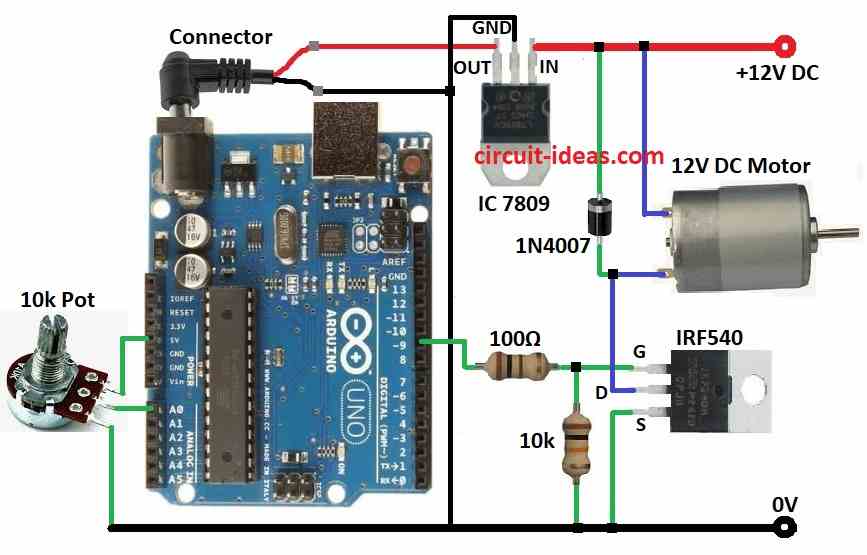
Parts List:
| Components | Quantity |
|---|---|
| Resistors (All resistors are 1/4 watt) | |
| 100Ω | 1 |
| 10k | 1 |
| Potentiometer 10k | 1 |
| Semiconductors | |
| Arduino UNO | 1 |
| IC 7809 | 1 |
| MOSFET IRF540 | 1 |
| Diode 1N4007 | 1 |
| DC Motor 12V 1Amp | 1 |
In this article the 12V power give power to circuit and Arduino make PWM signal to control MOSFET and also 10k potentiometer set PWM duty cycle and controls motor speed.
Furthermore, the MOSFET acts as a switch and the PWM controls it; it also changes the voltage supplied to the motor.
Also, one diode connect with motor to stop reverse EMF from motor coil and also motor uses own 12V power; finally, MOSFET controls voltage and so it controls motor speed.
How to Build:
To build a DC Motor Speed Controller Circuit using Arduino following are the connections steps to follow:
- First, collect all parts shown in circuit diagram.
- Next, connect Arduino 5V and GND to PCB.
Potentiometer Connection:
- Then one outer pin connects to 5V, middle pin connects to A0 and then other outer pin connects to GND
MOSFET Connections:
- Connect 100 ohm resistor between Arduino pin 9 and MOSFET gate, then connect 10k resistor between MOSFET gate and GND.
- After that, connect MOSFET source to GND, connect MOSFET drain to one motor wire and then connect other motor wire to 12V positive.
Diode and IC Connections:
Conclusion:
Overall, this project for DC Motor Speed Controller Circuit using Arduino controls DC motor speed using Arduino, MOSFET and potentiometer.
Furthermore, Arduino make PWM signal and MOSFET change motor voltage and potentiometer sets the speed; also its simple way to learn motor control with electronics.