
Modern devices and homes need good temperature control and this circuit help gadgets live long and make place comfortable.
One example is fan with temperature control, fan change speed by room temperature and this keep temperature okay, save power and with less noise.
Furthermore, the LM35 sensor measures the temperature and when the temperature becomes too high, the 5V relay turns ON the fan to cool the room.
Also, this project for DIY Temperature-Controlled Fan Circuit with Arduino is a useful project, as Arduino is easy and popular for smart temperature system and it makes sensor and device connection simple.
Arduino Code:
#include <SoftwareSerial.h>

const int tempPin = A0; // Analog pin for temperature sensor
const int relayPin = 2; // Digital pin for relay
const int thresholdTemp = 30; // Temperature threshold in degrees Celsius

void setup() {
  Serial.begin(9600);
  pinMode(relayPin, OUTPUT);
}

void loop() {
  int sensorValue = analogRead(tempPin);
  float temperature = (sensorValue / 1023.0) * 5.0 * 100.0; // Convert sensor value to temperature

  Serial.print("Temperature: ");
  Serial.print(temperature);
  Serial.println(" degrees Celsius");

  if (temperature >= thresholdTemp) {
    digitalWrite(relayPin, HIGH); // Activate relay
    Serial.println("Fan turned on");
  } else {
    digitalWrite(relayPin, LOW); // Deactivate relay
    Serial.println("Fan turned off");
  }

  delay(1000); // Delay for 1 second
}
Code Explanation:
- The code originally included the
#include <SoftwareSerial.h>library, but it was not required, so we removed it. - const int tempPin = A0;
- Sensor connected to analog pin A0.
- const int relayPin = 2;
- Relay connected to digital pin 2.
- const int thresholdTemp = 30;
- Fan will turn on if temperature goes over 30°C.
- Serial.begin(9600);
- Start serial monitor to send/receive data.
- pinMode(relayPin, OUTPUT);
- Set relayPin as output to control relay.
- int sensorValue = analogRead(tempPin);
- Read sensor value from tempPin.
- float temperature = (sensorValue / 1023.0) * 5.0 * 100.0;
- Convert sensor value to Celsius.
- LM35 gives 0 to 5V which is equal to 0 to 100°C.
- Serial.print(“Temperature: “);
- Print “Temperature:” to serial monitor.
- Serial.print(temperature);
- Print real temperature value.
- if (temperature >= thresholdTemp) {
- Check if temperature is 30°C or more.
- digitalWrite(relayPin, HIGH);
- Turn ON relay (fan ON).
- Serial.println(“Fan turned on”);
- Show message fan is ON.
- If temperature is less than 30°C,
- digitalWrite(relayPin, LOW);
- Turn OFF the relay (fan OFF).
- Serial.println(“Fan turned off”);
- Show message fan is OFF.
- delay(1000);
- Wait 1 second before checking again.
Circuit Working:
Parts List:
| Components | Quantity |
|---|---|
| Arduino UNO board | 1 |
| IC 7809 voltage regulator | 1 |
| IC LM35 temperature sensor | 1 |
| 5V single channel relay | 1 |
| 220V AC fan | 1 |
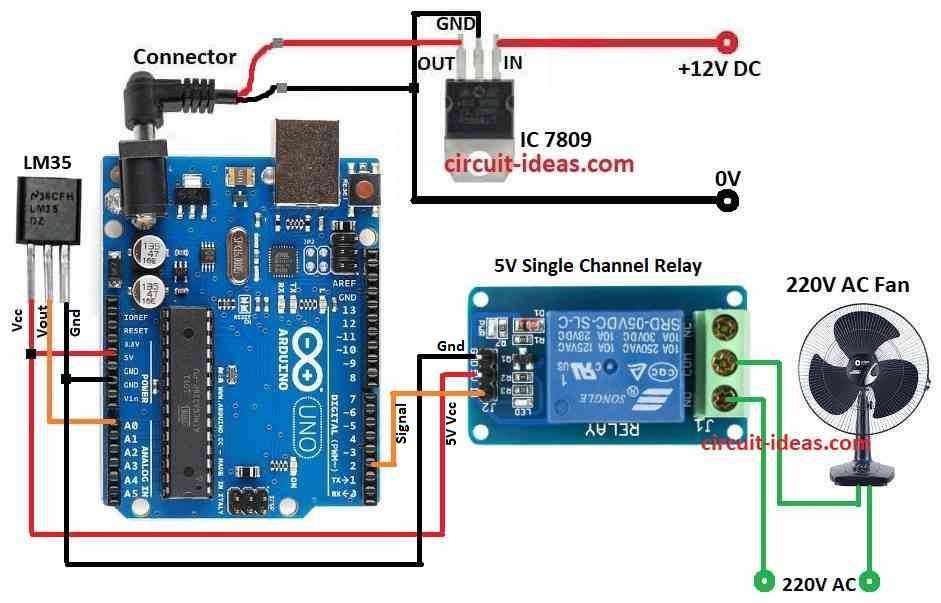
This above circuit for temperature control fan is simple to make, IC LM35 sensor has 3 pins: VCC, GND and analog out.
Connect the VCC pin to the 5V pin of the Arduino, connect the GND pin to the Arduino GND and connect the analog output pin to the A0 pin of the Arduino, then the IC 7809 regulates the supply voltage for the LM35 sensor.
Moreover, IC LM35 gives voltage based on temperature and Arduino reads this voltage on analog pin and then Arduino compare temperature with set value.
The 5V relay turns the fan ON or OFF and controls high-power devices using a low-power signal and when the temperature rises above 30°C, the relay turns ON and connects the 220V AC fan to the power supply.
Fan starts cooling when relay turns ON and then Arduino turns ON relay when LM35 shows temperature above 30°C and this helps to keep temperature in limit.
After that, if temperature is below 30°C then Arduino keep relay OFF and fan also stays OFF and then fan works only when needed and this saves power and keeps room cool.
How to Build:
To build a DIY Temperature-Controlled Fan with Arduino following are the steps to follow:
- First, gather all parts from the circuit diagram.
- Next, use IC1 7809 to give stable 9V DC to Arduino.
- Now connect LM35 VCC pin to Arduino 5V pin, Vout pin to A0 on Arduino and GND pin to Arduino GND pin.
- Then connect Relay signal pin to pin 2 on Arduino, COM pin to Arduino 5V pin and GND pin to Arduino GND.
- After that, connect one wire of AC fan to 220V AC and other wire to relay COM pin and then connect relay NO pin to 220V AC.
Conclusion:
Overall, this project for DIY Temperature-Controlled Fan Circuit with Arduino shows Arduino can do everyday life auto control.
Here, the system turns the fan ON or OFF based on the room temperature and helps keep the area cool; we can also add more features, such as data logging or fan speed control, by modifying the code.