
POV means Persistence of Vision; our eyes cannot see very fast blinking light separately, if light blinks very fast then we see it like a line or picture.
Hence, using this idea we can create letters or shapes with some LEDs and Arduino controls LEDs in speed to make effect of display.
This project uses an Arduino Nano, several LEDs, resistors and a 9 V battery, then arrange the LEDs in a line and rotate or move them rapidly to create the display effect.
When Arduino switch ON and OFF LEDs in sequence then it looks like text or design is floating in air.
Arduino Code:
// Arduino POV Display with 10 LEDs and Hall Sensor
// LEDs connected to D2–D9, D11, D12
// Hall sensor connected to D10

const int ledPins[10] = {2, 3, 4, 5, 6, 7, 8, 9, 11, 12}; // 10 LED pins
const int hallPin = 10;                                    // Hall sensor pin
int hallState = 0;

// Example pattern for letter "A" (10 rows)
byte patternA[10] = {
  B0001111000,
  B0010000100,
  B0100000010,
  B0100000010,
  B0111111110,
  B0100000010,
  B0100000010,
  B0100000010,
  B0100000010,
  B0100000010
};

void setup() {
  // Set all LED pins as OUTPUT
  for (int i = 0; i < 10; i++) {
    pinMode(ledPins[i], OUTPUT);
  }
  pinMode(hallPin, INPUT);
}

void loop() {
  // Wait for hall sensor trigger (magnet passes sensor)
  hallState = digitalRead(hallPin);
  if (hallState == LOW) {
    showLetter(patternA); // show letter A
  }
}

// Function to display a letter pattern
void showLetter(byte letter[10]) {
  for (int col = 0; col < 10; col++) {
    for (int row = 0; row < 10; row++) {
      if (bitRead(letter[col], row)) {
        digitalWrite(ledPins[row], HIGH);
      } else {
        digitalWrite(ledPins[row], LOW);
      }
    }
    delayMicroseconds(1000); // adjust for clarity of letter
  }
}
Circuit Working:
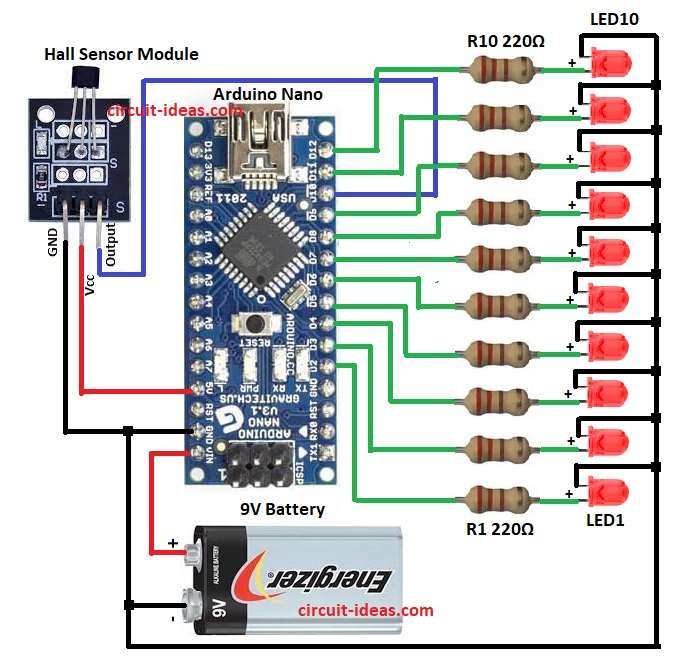
Parts List:
| Components | Values | Quantity |
|---|---|---|
| Resistors | 220Ω 1/4 watt | 10 |
| Semiconductors | Arduino Nano | 1 |
| Hall Sensor Module | 1 | |
| Red LEDs 5mm 20mA | 10 | |
| 9V Battery | 1 |
The heart of this project is Arduino Nano and it controls 10 LEDs through pins D2 to D12 and also wach LED has resistor in series to limit current.
The Arduino receives power from a 9 V battery through its Vin pin.
The circuit also includes a small IR sensor module connected to pin D10 of the Arduino.
After that, use this sensor to synchronize the display or detect the rotating position.
The sensor sends a signal to the Arduino at a specific position, and the Arduino then starts sending the pattern to the LEDs.
When motor or hand rotates LED strips fast and Arduino blink LEDs in programmed pattern; so our eye see full letters or symbols because of persistence of vision.
Note:
We can use an old fan which is one of the easiest ways to rotate the LEDs for a POV display; also many hobbyists do this because:
The fan motor provides steady rotation and hobbyists can easily find it at low cost in old table fans, CPU fans or cooler fans.
Therefore, we can just attach the LED strip with Arduino Nano on one blade or on a piece mounted to the fan.
Formula:
For LED resistor value we use ohms law formula:
R = (Vcc – Vf) / If
here,
- Vcc is 5V from Arduino pin
- Vf is forward voltage of LED which is approx 2V
- If is forward current which is approx 20mA
How to Build:
To build a POV Project with LEDs and Arduino Circuit follow the below steps for connections:
- First, take all the parts as shown in circuit diagram
- Next, Arduino Nano Vin pin connected to 9V battery positive and Arduino Nano GND connected to battery negative
- Connect pins D2 through D12 to one end of the resistors, and connect the other ends of the resistors to the LED anodes in series.
- Also, all LED cathodes connected together to ground
- Now IR sensor module VCC pin connect to 5V pin of Arduino.
- IR sensor GND pin connect to Arduino GND
- IR sensor output pin connect to pin D10 of Arduino as per circuit diagram
Conclusion:
To conclude, this POV Project with LEDs and Arduino Circuit shows how simple parts can create visual magic.
By blinking LEDs rapidly, the Arduino creates words or shapes in the air; therefore, we call this a Persistence of Vision (POV) display.
Moreover, we can program different patterns or letters, as it is fun project for beginners and also useful for learning timing, sensor and LED control with Arduino.