No button needed as this circuit uses a smart chip known as TTP223 to feel our touch.
Like magic it touches the pad and it turns ON or OF; as this Simple Capacitive Touch Switch Circuit using IC TTP223 is an easy way to make a touch switch for fun or projects.
Circuit Working:
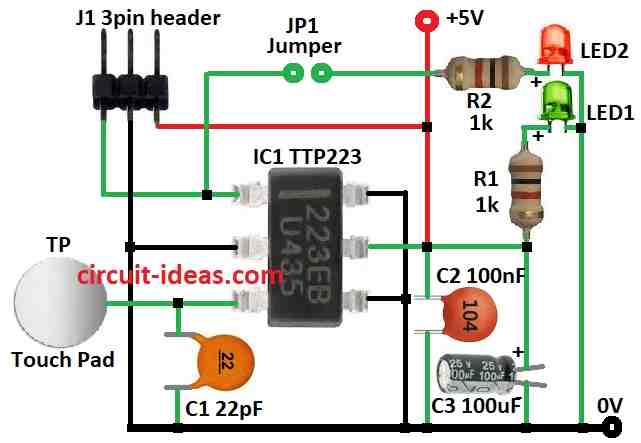
Parts List:
| Components | Values | Quantity |
|---|---|---|
| Resistors | 1k 1/4 W | 2 |
| Capacitors | Ceramic 22pF | 1 |
| Ceramic 100nF | 1 | |
| Electrolytic 100µF 25V | 1 | |
| Semiconductors | IC TTP223 | 1 |
| LED 5mm green | 1 | |
| LED 5mm red | 1 | |
| Jumper | 1 | |
| 3 pin header | 1 | |
| Touch pad | 1 |
To begin with, this is a basic touch switch circuit for electronics hobby people; even though it uses SMD parts it is easy to make on an SMD board.
The small ₹20 TTP223 chip in a BA6 package serves as the main component, as this TTP223 touch sensor IC functions as a button, allowing you to simply touch a pad instead of pressing a switch.
Also, it uses low power and works with DC or AC and we can connect it to any microcontroller using 3 pin header J1.
Furthermore, use 5V for power when we touch pad TP and output pin OUT goes high.
Green LED1 shows power is ON and Red LED2 shows output status as optional.
Then, close solder jumper JP1 to use LED2; also, the designer built a test version on a standard circuit board with regular components.
TTP223 was on SMD to DIP adapter with small 10mm x 10mm copper board used as touch pad and if we build this way keep wire from pad to pin 1 of TTP223 very short.
Some modules use 1k resistor between pad and pin 3 of TTP223 but not tested yet, as touch pad size and wire length affect sensitivity.
So to increase sensitivity use bigger or thinner touch pad and adjust for our use.
How to Build:
To build a Simple Capacitive Touch Switch Circuit using IC TTP223 follow the below mentioned connections steps:
Prepare the SMD Board:
- First, cut board to right size with big enough for parts and wires.
Mount TTP223 IC:
- Next, solder TTP223 chip on board and check datasheet for chip direction.
Connect Parts:
- Now solder 3 pin header J1 on board and ensure pin direction is right.
- After that, solder green LED for power and solder red LED for output if needed.
- If using 1k resistor between touch pad and pin 3 then solder it.
Add Touch Pad:
- Cut small copper board with about 10mm x 10mm and then solder wire from pad to pin 3 of TTP223.
Final Wiring:
- Connect VCC and GND to power and then connect OUT pin to microcontroller or other circuit.
Use Output LED (Optional):
- To use red LED for output, bridge jumper JP1.
Test Circuit:
- Power the board and touch the copper pad.
- Green LED should turn ON (power) and red LED shows output if connected.
Adjust Sensitivity:
- If needed change pad size or thickness, bigger or thinner pad is more sensitive.
Mount Everything:
- Put circuit in a box or fix it on a surface.
Note:
- This is basic guide and check TTP223 datasheet for full details.
Conclusion:
To conclude, this Simple Capacitive Touch Switch Circuit using IC TTP223 is simple and cheap, as it is good for hobby or DIY use.
Also, this circuit is easy to make with no button needed.

Leave a Reply